


Problem

Trading crypto is foreign territory for me, and I needed a way to enter the market without a steep barrier to entry when it came to technical analysis and programmatic expertise.

Opportunity

By utilizing resources and tools available in the crypto trading space and the tech space, I created a multi-coin, multi-strategy algorithmic trading bot that focuses on a variety of crypto currencies and adjusts its strategy based on market data.

Interactive Demo (Backtested Data)

The trading dashboard replaying real history: Bitstamp prices up to 31 December 2024 and the trades the bot's rules made on them in a backtest, with fees and slippage included. This is not live or paper-trading performance, and the locked-away year 2025 is not used. Switch between the Bullrunners and Trend Momentum strategies, change the chart timeframe, and turn pairs or strategies on and off. The switches only change this page.

Open the full demo in a new tab

Product Teardown

Secure Weblink for Trading Dashboard

1. Secure Weblink for Trading Dashboard

Connect securely to the trading dashboard with a secure link provided via Tailscale.

Note: The dashboard is running on a local server, and the link is only accessible to authorized users.

Select a Strategy and View Trade Data

2. Monetization & Pricing Transparency

Evaluated fee structure visibility during active market orders. Hidden tier structures create cognitive friction, leading to abandoned order confirmations among high-frequency users.

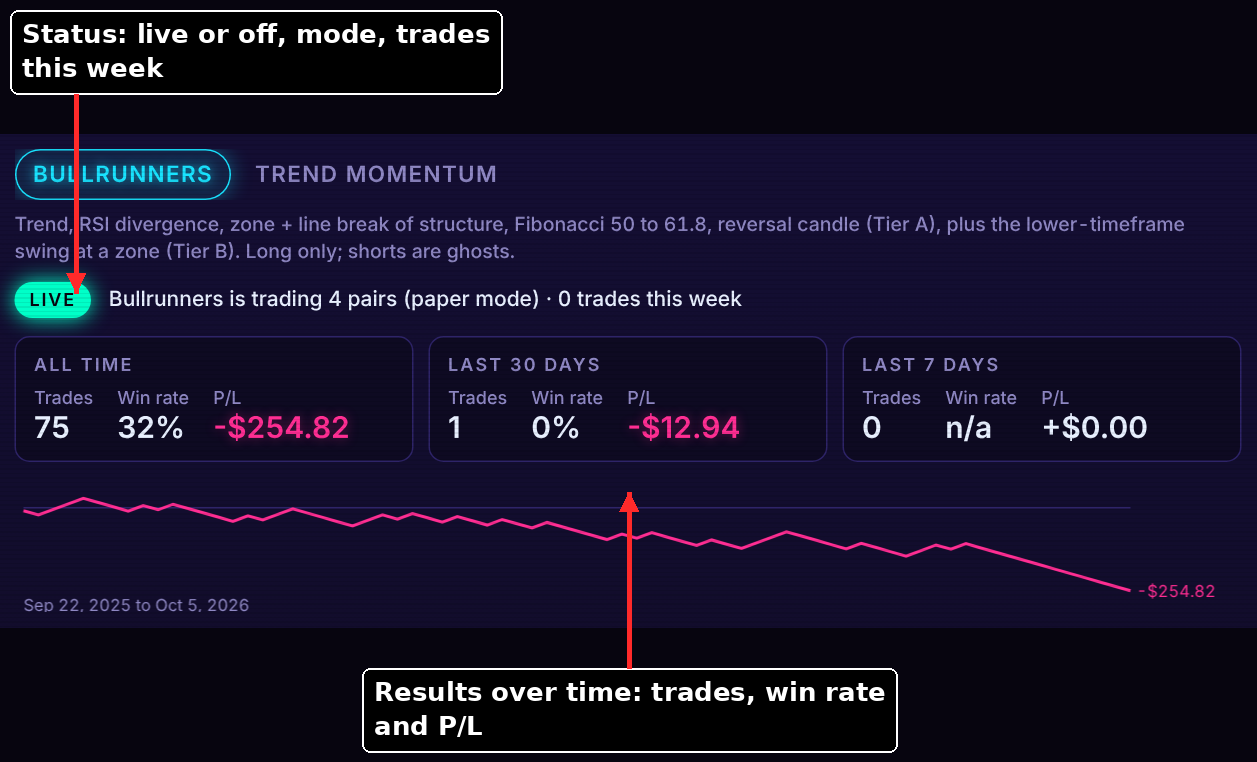
Strategy summary, LIVE badge and results over time

3. Strategy Status & Results

Each strategy tab opens with a plain-language summary of what it trades, a LIVE or OFF badge, the mode (paper) and the trades so far this week. Three windows (all time, last 30 days, last 7 days) and an equity curve show trades, win rate and profit or loss. Gap found: the figures are raw P/L, with no line showing what fees took.

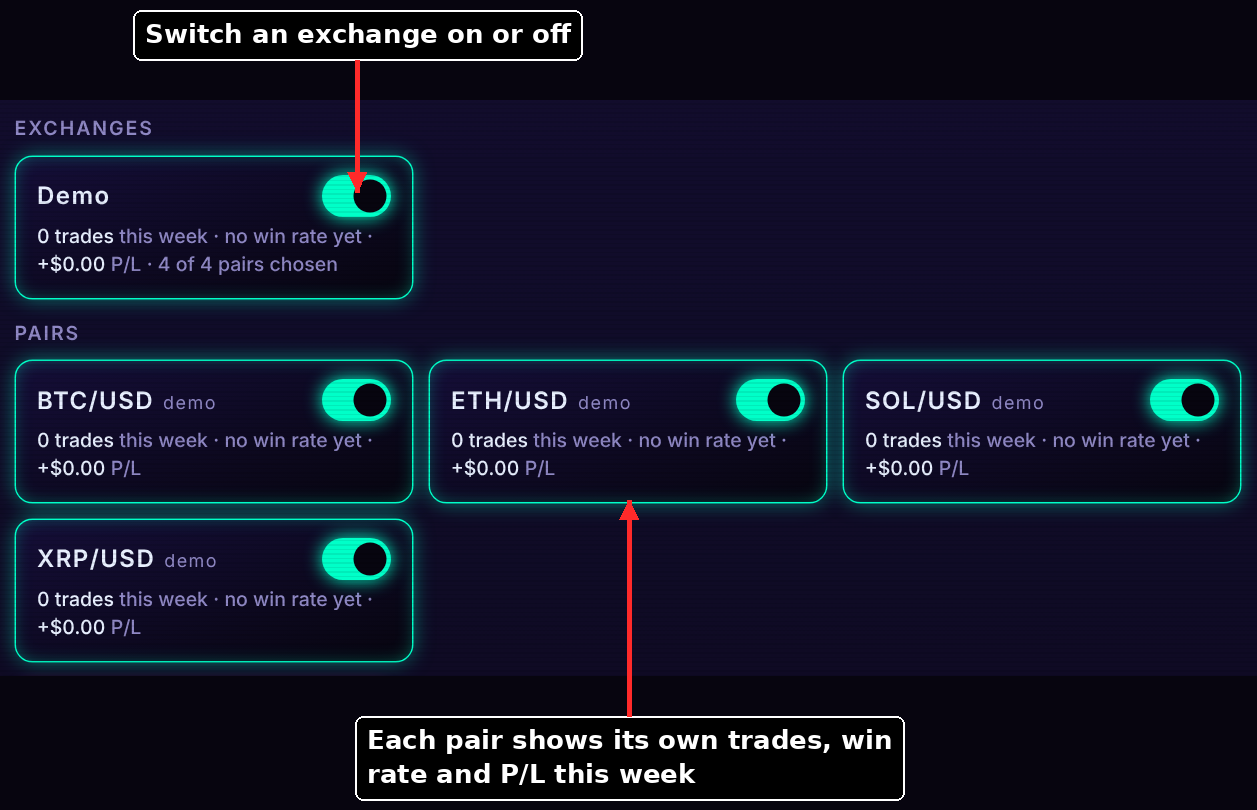
Exchange and pair switches with weekly stats

4. Exchange & Pair Switches

Every exchange and pair is a card with its own on/off switch and its own trades, win rate and P/L for the week. Turning an exchange off dulls the pairs under it, and the saved choices are kept so a pause never loses a setup. Observation: stats on each card let the owner spot a weak pair without opening a report.

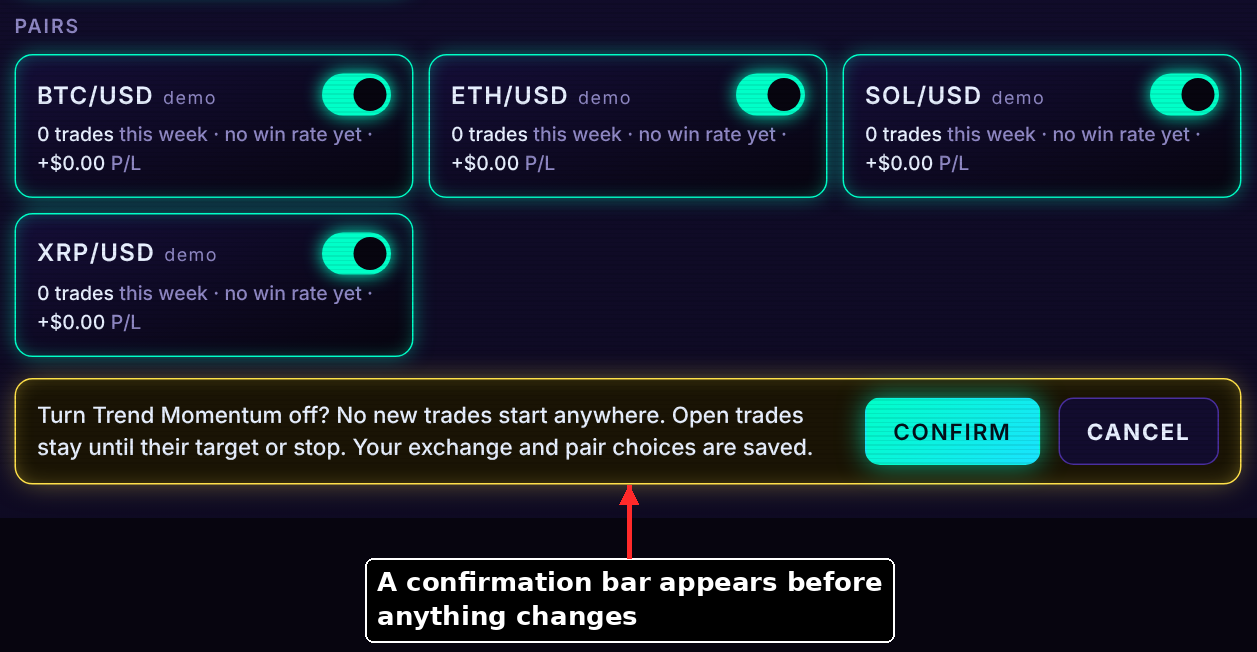
Confirmation bar before a strategy is turned off

5. Guarded Controls

A strategy is never switched on a single tap. A confirmation bar spells out the consequence first: no new trades start, open trades stay until their target or stop, and the exchange and pair choices are saved. Turning on follows a fixed order: exchanges, confirm, pairs, confirm, go live. Gap found: strong protection against accidents, but no log of what was switched and when.

Top bar with market, timeframe and paper mode

6. Market, Timeframe & Mode

The top bar sets the context for the chart: market pills, timeframe pills (1W, 1D, 4H, 1H) and the mode badge. "Mode: Paper" is always on screen, so the owner never has to wonder whether real money is involved. On this public copy a yellow banner adds that the data is a simulation.

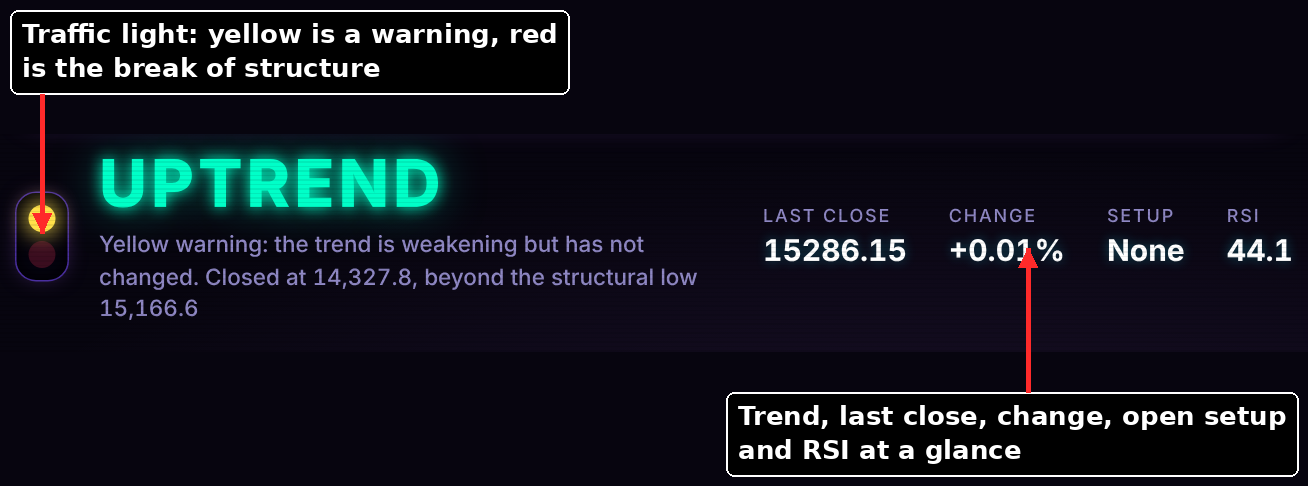
Trend word with yellow and red warning bulbs

7. The Trend Light

The chart opens with a traffic light. The large word is the current trend, a yellow bulb means the trend is weakening but has not changed, and red means the structure has broken. Beside it sit the last close, the change, the open setup and RSI. Observation: one glance answers "what state is the market in", and the sentence under the word says why.

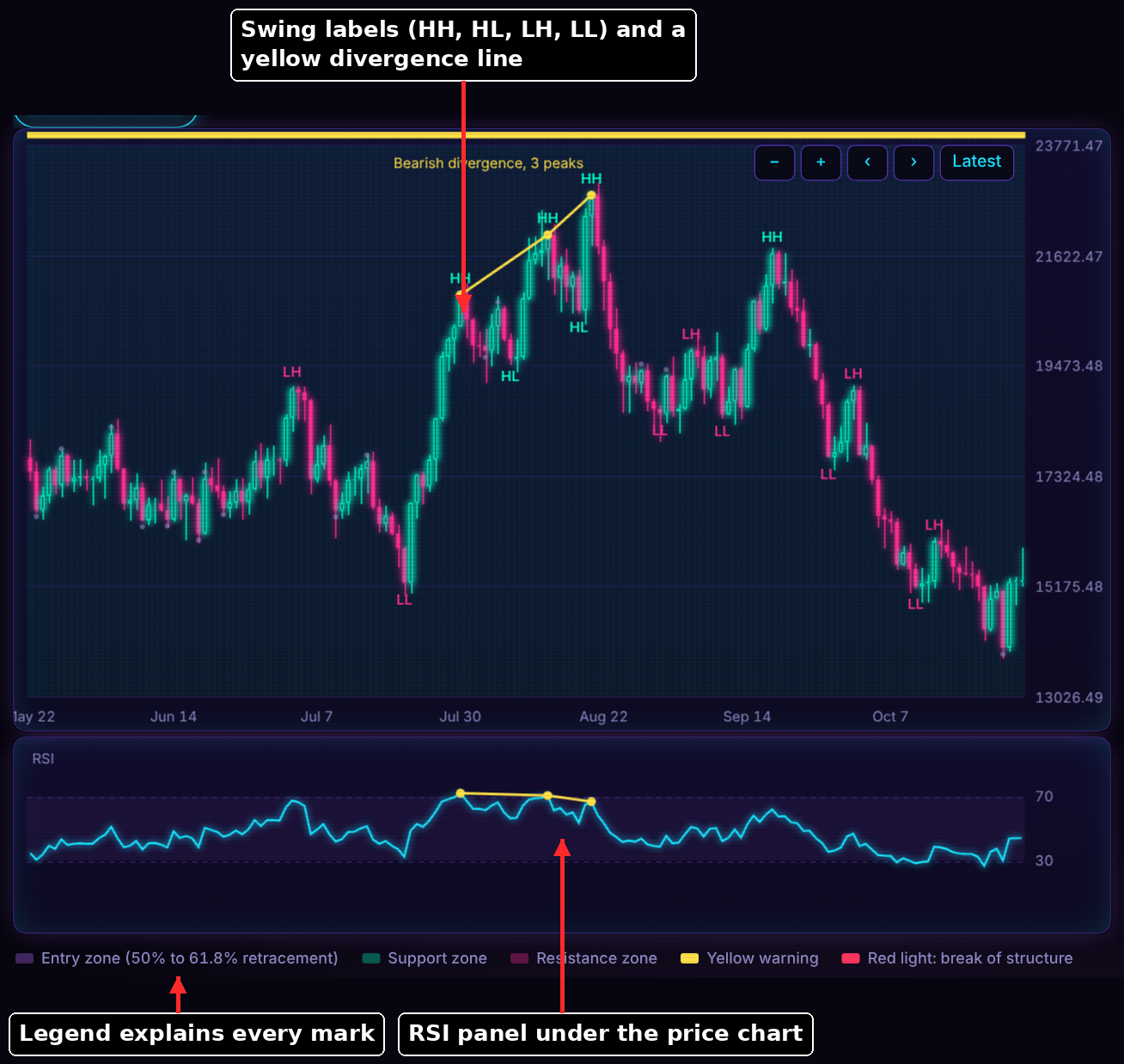
Price chart with swing labels, divergence line, RSI and legend

8. Reading the Chart

For the Bullrunners Strategy, candles carry swing labels (HH, HL, LH, LL) and divergence lines, with zones, lines and Fibonacci areas drawn when a setup forms. The RSI panel sits underneath and a legend decodes every colour. Gap found: the chart is complete for its author but dense for a newcomer, which drives recommendation P4.

Each strategy inputted has its own unique features and visualizations.

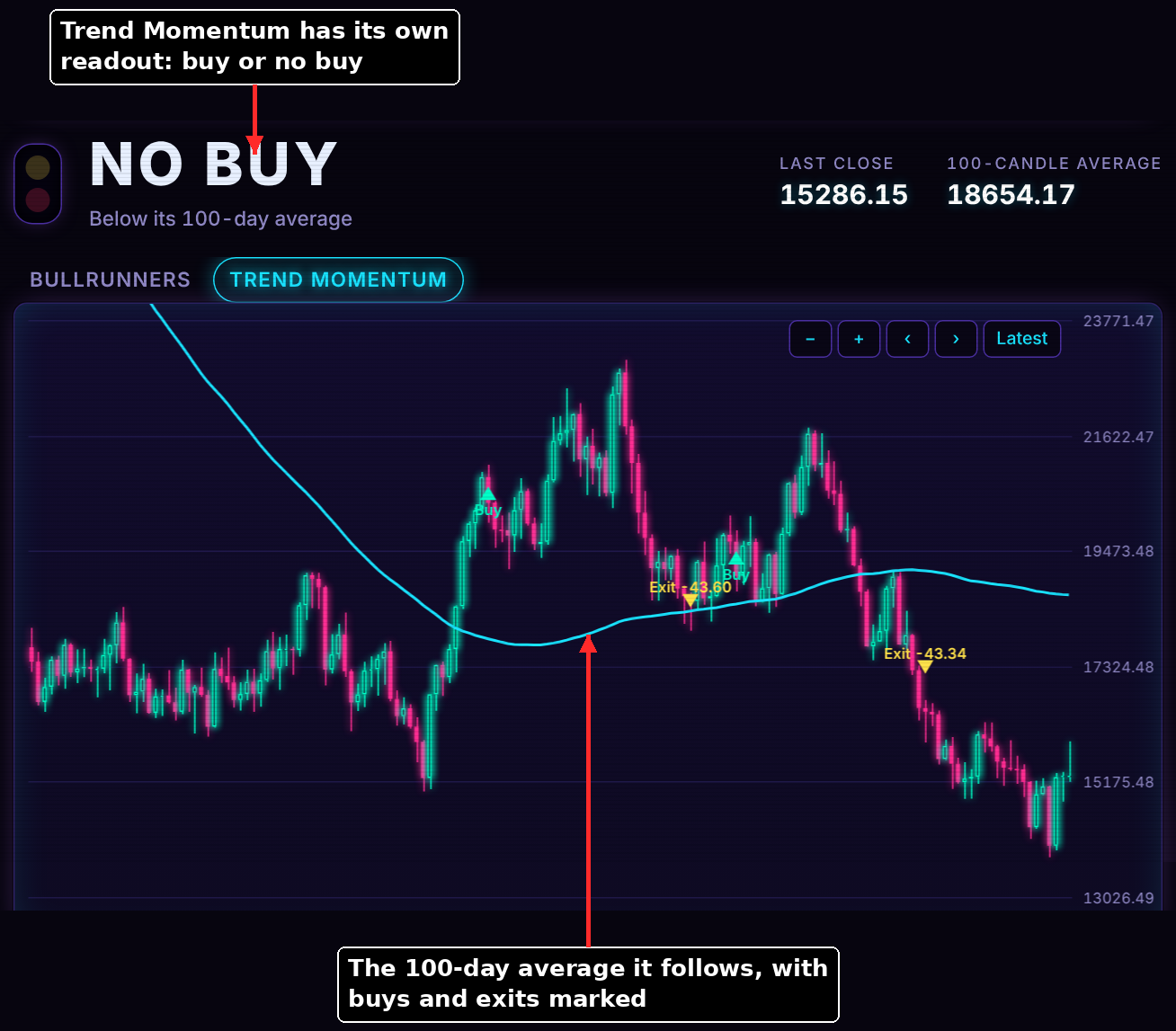
Trend Momentum chart with buy or no-buy readout

9. A Second Strategy, Its Own Chart

Switching the strategy tab switches the chart with it. Trend Momentum shows a buy or no-buy readout, the 100-day average it follows and its buy and exit markers, with no RSI. Observation: each strategy explains only its own method, so adding a third means adding a tab and a chart, not reworking the page.

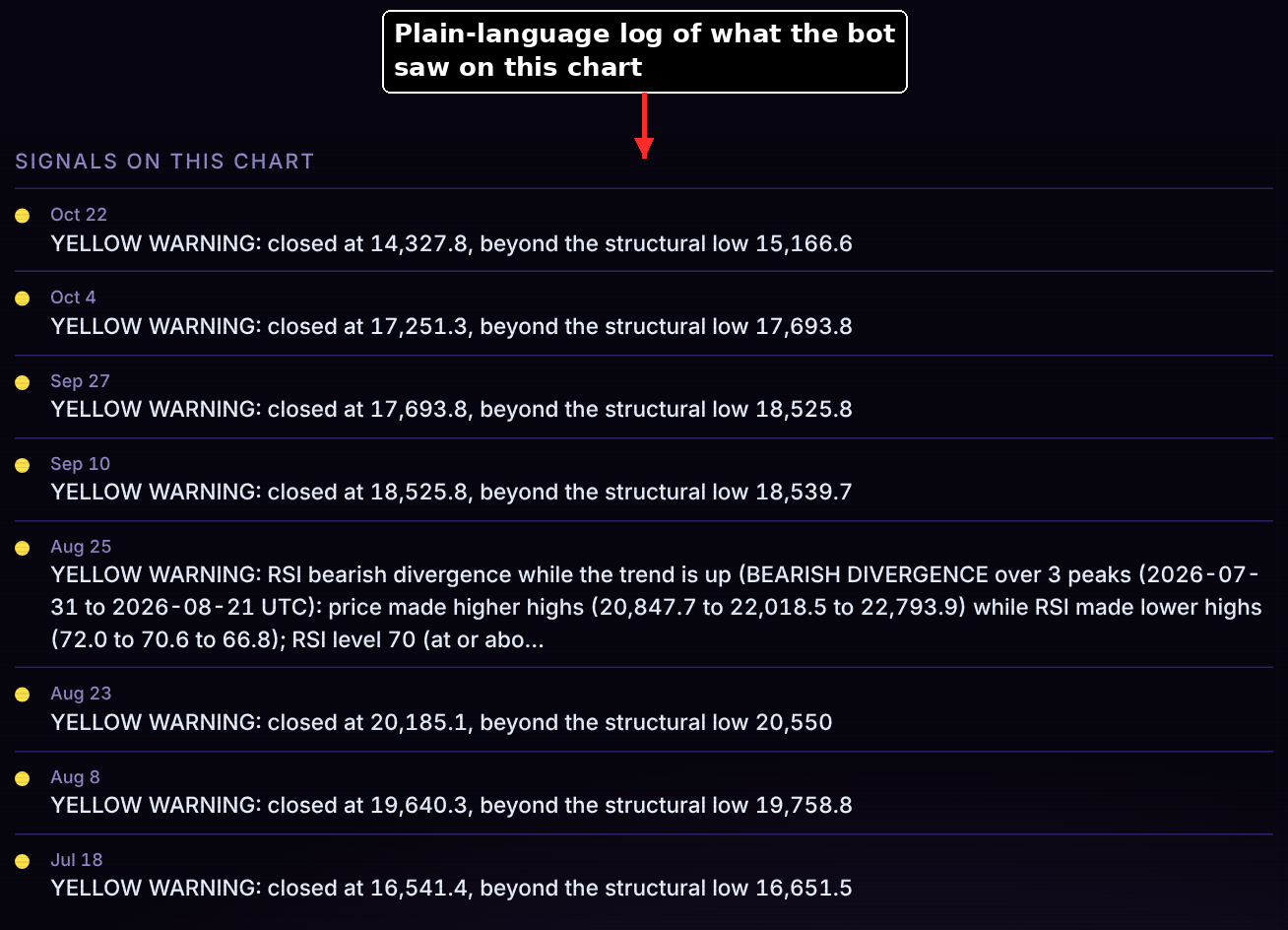
Dated list of signals on the chart

10. Signals Log

Under the chart is a dated list of everything the bot flagged on that chart, in plain language: the price it closed at and the level it crossed. Observation: every event carries a plain-language reason, so the owner can review a decision without reading code or logs.

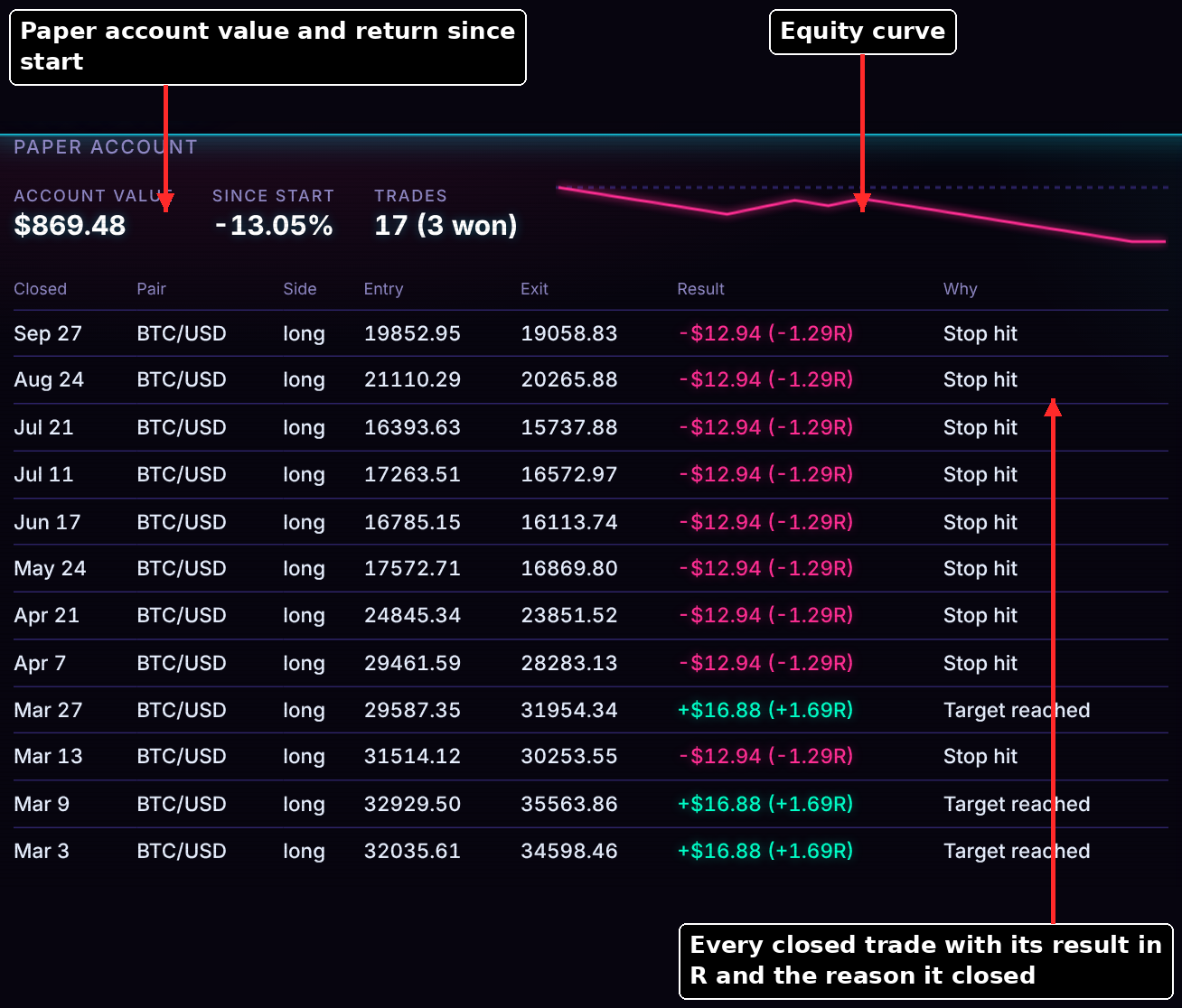
Paper account value, equity curve and closed trades

11. Paper Account

The account section shows the paper account's value, return since start, trade count, equity curve and every closed trade with entry, exit, result in dollars and in R (risk multiples) and why it closed (stop hit or target reached). Gap found: a trustworthy audit trail, but it does not show how much fees and slippage took from each result.

Once the bot is configured to trade on exchanges, the paper account will be replaced with a live trading account.

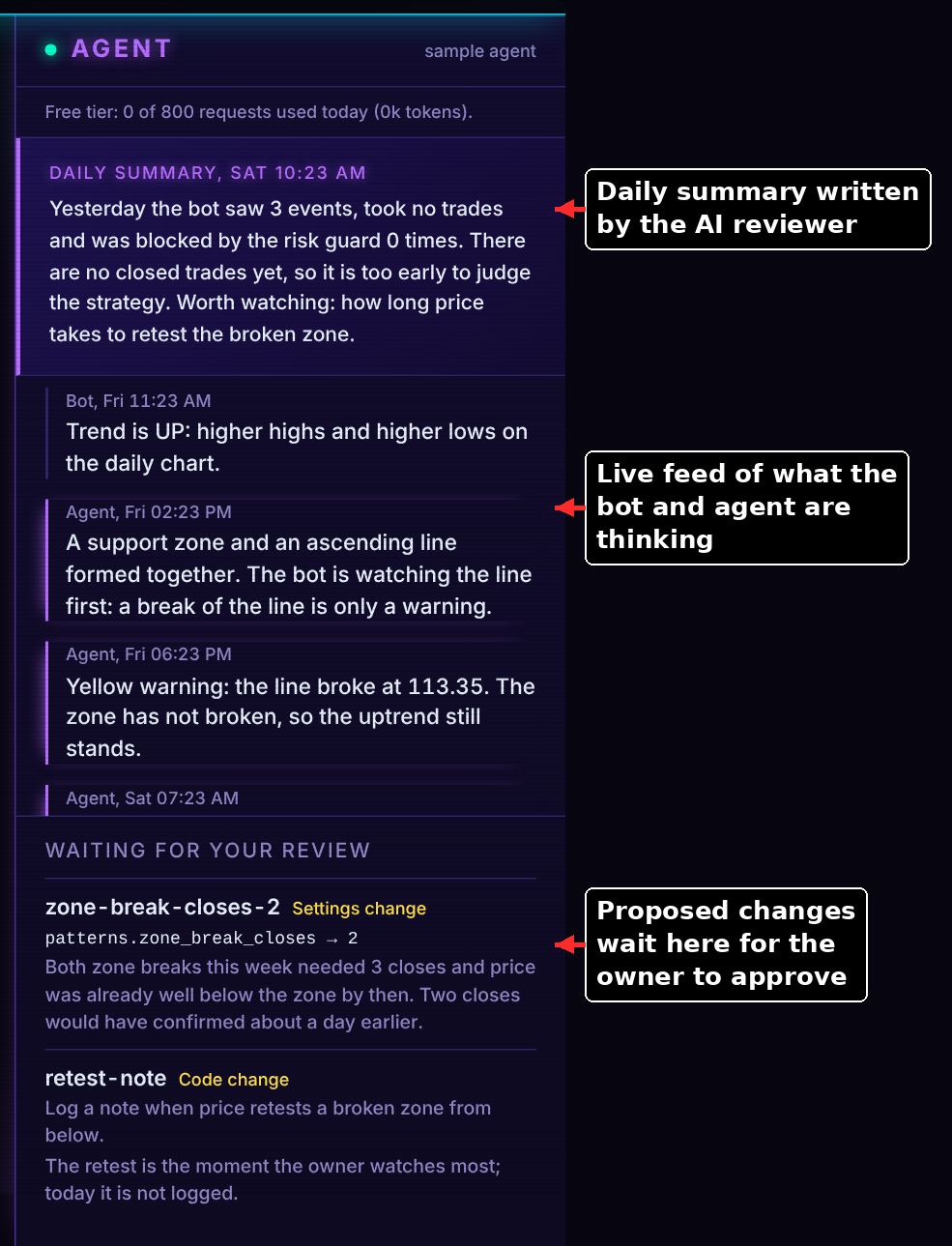
Agent panel with daily summary, feed and proposals waiting for review

12. AI Reviewer

The agent panel carries a daily summary, a live feed of what the bot and the AI reviewer noticed, and a "Waiting for your review" queue. The reviewer can propose settings or code changes, but only the owner can approve them. Gap found: human approval is the right control, but each proposal gives a reason without the evidence (sample size, backtest result) that would make approving quick.

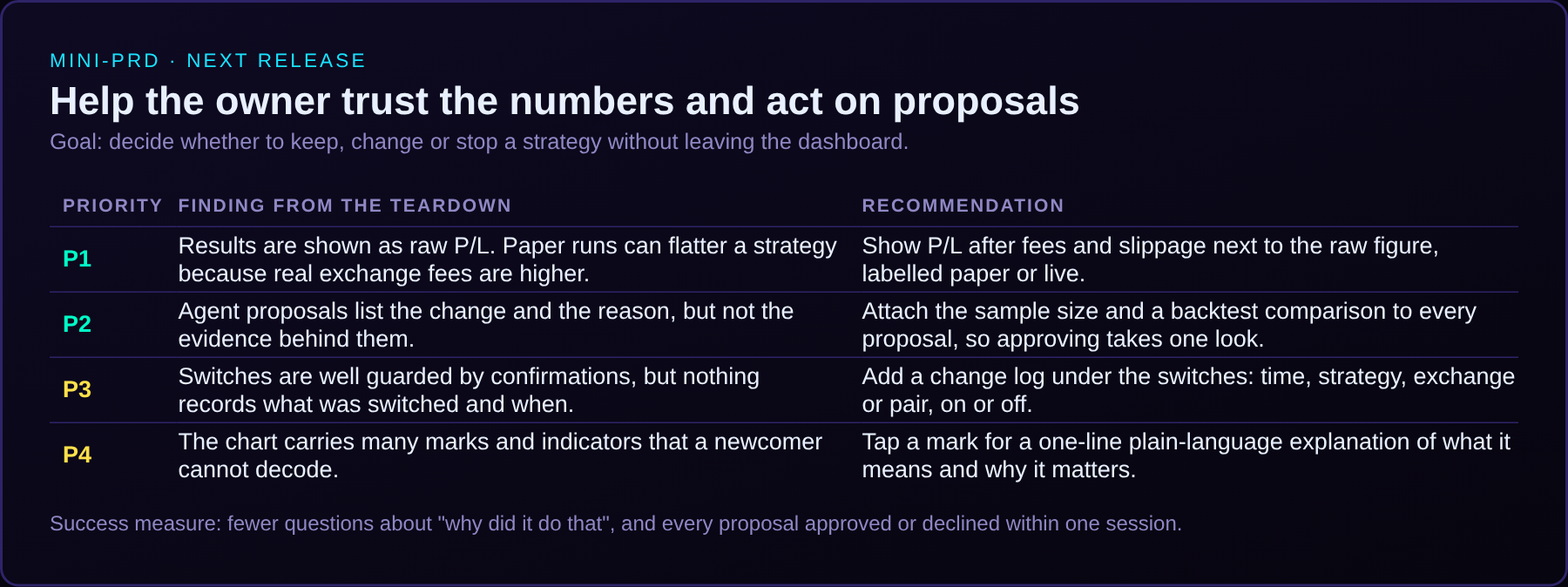
Mini-PRD with four prioritised recommendations

13. PO Recommendations & Mini-PRD

Four recommendations came out of the teardown, ranked by how much they help the owner trust the numbers and act on them: P1 results after fees and slippage, P2 evidence on every agent proposal, P3 a change log for the switches, P4 plain-language explanations on chart marks. Success measure: the owner can keep, change or stop a strategy in one session, without leaving the dashboard.

API Integrations

The bot never scrapes a website. Every price, balance and order it sees arrives through an exchange's public or authenticated REST API. Each exchange sits behind one shared interface, so a strategy never knows which platform it is talking to, and adding an exchange is a config entry plus one adapter. This section covers what each connection pulls, and the full scope of API work that had to be right before the numbers could be trusted.

What each connection pulls

Swipe to see more →

Primary venue (paper traded)

Coinbase Advanced

  • Price history (public): candles for BTC, ETH, XRP, SOL, ADA, LINK and AVAX on 1h, 4h and 1d, plus 30m, 15m and 5m for the last 540 days.
  • Account balance (view-only key): holdings by currency. Checked live during the connectivity phase.
  • Open orders: part of the same interface, read only.
  • Fees: the real schedule, 0.40% maker and 0.60% taker at the starting tier, applied to every simulated fill.

Auth: API key plus private key from environment variables, signed per request by the CCXT library.

Research data only

Bitstamp and Bitfinex

  • Deep price history (public): Bitstamp supplies years of candles, far more than Coinbase offers for these pairs, so backtests have enough trades to mean something.
  • Bitfinex limits requests per minute, so the client asks for 5,000 candles per page and pauses 6 seconds between calls.
  • Never merged: each exchange's candles are stored separately because their prices differ slightly.

Auth: none needed. Public market data only.

Paper trading only

Gemini

  • Price history (public): daily, hourly and short-term candles. The API has no native 4h candle, so the adapter builds it from 1h data.
  • Fees: 0.20% maker and 0.40% taker, modelled separately from Coinbase's.
  • Coverage is checked, not assumed: ADA/USD is switched off because the API reported it is not listed.

Auth: none needed for market data.

Read-only key

Robinhood Crypto

  • Live price: best bid and ask including Robinhood's built-in spread.
  • Why it matters: Robinhood advertises zero fees but earns on the spread. Reading it from the API measures the real cost before a zero-fee backtest is trusted.
  • Buying power: the only account value it reads.
  • No price history exists in this API, so signals still come from another exchange's candles.

Auth: read-only key. Every request carries the key, a timestamp valid for 30 seconds and an Ed25519 signature.

Scope checklist: what had to be covered

Pulling a price is one line of code. Making it dependable is the actual scope. These are the concerns I made sure were specified, built and tested before any strategy result was trusted.

Swipe to see more →

Built + tested
Authentication

Keys come from environment variables, never from code, config or logs. Coinbase's multi-line private key and Robinhood's signed headers each have their own handling. A missing or rejected key produces a plain message naming what to fix.

Built + tested
Least privilege

Reading and trading are separate powers. Keys are read-only where the exchange allows it, and placing or cancelling an order is blocked in the client code itself until it passes a review.

Built + tested
Rate limiting

Built-in throttling, a per-exchange pause for strict ones (Bitfinex), and a back-off of 60 then 120 seconds if an exchange still answers "too many requests". Downloading six years of 5-minute data for seven coins is rate-limited, so it resumes where it stopped.

Built + tested
Retries and errors

Network failures retry three times with doubling waits (1s up to 30s). Rejected credentials are never retried. Every library error is translated into one of six plain ones, such as bad credentials, network problem or unknown pair.

Found by testing
Pagination and API limits

Coinbase documents 350 candles per request, but the live API returned 300. The first real download therefore had a 50-candle hole in every 350. The fix was to request 300 and continue from the last candle received, plus a repair command for the data already saved.

Built + tested
Storage: SQLite

One SQLite file, keyed by exchange, pair, timeframe and time. It needs no install, writes atomically, and holds every pair and timeframe in one place for backtests, paper trading and the dashboard. Repeat syncs fetch only new candles.

Built + tested
Data integrity

Only closed candles are stored or served. Rows are validated, sorted and de-duplicated. Missing history is detected, never silently bridged. Timeframes an exchange lacks are built from smaller ones: 4h from 1h, weekly and monthly from daily.

Built + tested
Cost modelling

Each venue's real maker and taker fees are applied to simulated fills, plus slippage. Robinhood's hidden cost is measured from its quoted spread instead of assumed to be zero.

Defined up front
Acceptance tests

Each build phase carries a written "done when" test. For the connection layer: the check script shows candles on every native timeframe and the right pair name, and orders stay disabled until the trading phase is reviewed.

How I Directed the Build

I am a product owner, not a Python developer, and I built this with Claude acting as the engineer. I set the outcomes, constraints and trade-offs, and Claude wrote and tested the code. The decisions below are mine, and each one changed how the API layer works. Where I changed my mind after seeing results, that is listed too.

1I define the outcomeGoals, constraints and what must never happen
2Claude proposes a phased planEach phase with a "done when" test
3I decide and recordDated owner decisions in the build plan
4Claude builds and tests liveReal exchange data finds the surprises
5I redirect from the resultsRevise, then repeat

Decisions I made (in my own words, paraphrased), and what they changed in the API layer

Swipe to see more →

Connect to a variety of exchanges, with a list where I toggle which ones to read and trade on.

Built: one shared exchange interface and a config file of exchanges and pairs with on and off switches. Live trading needs three separate confirmations.

I live in New York, so Kraken is out and Coinbase can't short. Longs only.

Built: Coinbase as the only traded venue, shorts switched off, and short setups recorded as simulated “ghost” trades that never reach an exchange.

Coinbase doesn't have enough history. Pull candles from other exchanges too.

Built: research-only exchanges (Bitstamp, Bitfinex) with a data policy for which history counts, kept apart from Coinbase data.

Never trade on data with holes. Later: treat gaps the way a real trade would experience an outage.

Built: gap detection first, then a rule that bridges short outages with flat, marked candles only when other exchanges kept moving, and never fills an order inside one.

Major code changes stay in review, and the AI must never be able to lose working core code.

Built: order placement hard-blocked in the exchange client, plus saved snapshots of the guarded core code with a restore command.

Robinhood says zero fees. I want to see the real cost. (I created the read-only key myself.)

Built: a read-only Robinhood client that reads bid, ask and buying power and can never trade.

Gemini's fees look much lower than Coinbase's. Add it, paper trading first.

Built: a Gemini connection with its own fee model, and the Coinbase fee schedule kept in mind with limit (maker) orders favoured.

I first assumed zero fees, then supplied Coinbase's actual fee tiers.

Changed: every backtest and paper trade now pays real fees plus slippage, which lowered the results and made them honest.

Who did what

My role: product owner
  • What the system must do, and what it must never do
  • Real-world constraints: legal location, fees, venue availability
  • Risk appetite: paper first, orders blocked, review before anything touches money
  • Which data counts as evidence, and how gaps are treated
  • Priorities and the order of the build
  • Accepting or redirecting each result
Claude's role: engineer
  • The CCXT-based adapter and the shared exchange interface
  • Authentication code, request signing and retry and rate-limit mechanics
  • The SQLite candle cache and pagination logic
  • Error translation, tests and the documentation for each phase
  • Finding and fixing issues surfaced by testing against the live APIs

What this shows: I understand how the APIs work well enough to specify them, question them and catch what they get wrong, such as fee assumptions, missing history and hidden spreads. I also know how to run an AI engineer through requirements, acceptance tests and review, without pretending I wrote the code myself.

Requirements and Scope

The bot needed to support multiple cryptocurrencies, as well as multiple trading strategies in a way to maximize the number of successful trades made each week and keep strategies organized in the process.

The bot also needed to effectively deploy AIML models to learn from trading data and suggest adjustments based on reports of the changing market conditions.

For the project scope, the bot was developed in Python and hooked languages like HTML, CSS, and Javascript to provide a live analysis dashboard to my computer and iPad. The bot is equipped with emailing and text messaging notifications to alert me of significant market movements and keep me updated on the unfoldin of trade opportunities.

Trade-Offs and Constraints

Not much has been sacrificed in the trading bot's functionality apart from the overall limitation for trading in New York that disallows shorting positions.

Along with the limitation of shorts, New York is also particularly strict when it comes to trading on exchanges, limiting the bot's multi-exchange functionality to Coinbase primarily.

Results

In progress!

Product Requirements Document (PRD)